When setting up to cut out thumbnails into squares in "Advanced Settings> Articles> Image Styles", a bug where the thumbnail size collapsed when posting a square image was found. This problem was fixed today.
We increased the upper limit of the set value
We have increased the upper limit of the following input values of "Customize> Header".
Increase the maximum number of characters of "Page Title> Main Title" from 30 to 90. Increase the maximum number of characters of "Page Title> Subtitle" from 30 to 90. Increase the numerical upper limit of "upper gap" and "lower gap" of "Page Title> Layout" from 100 to 300. Increase the numerical upper limit of "upper gap" and "lower gap" of "Menu> Layout" from 100 to 300.
Bug fixes
When the article footer was not used, a bug where the image was not displayed correctly was found. This problem was fixed today.
The display type can now be selected
"Photo" "Manga" as a display type of the gallery has newly appeared.
[Photo] We are specialized in displaying pictures and you can use the function of slideshow. View the sample (In another window open) View a sample slide show (opens in a separate window)
[Manga] It is a display type that considers reading works of manga and other, has the function of cartoon viewer. Watch the sample (In another window open) View cartoon viewer sample (opens in a separate window)
The conventional display type is positioned as "normal", and the display does not change unless it is changed on the user side. The setting method can be done from "Administration screen> Advanced setting> Display type". Please also refer to manual page as well as how to set it.
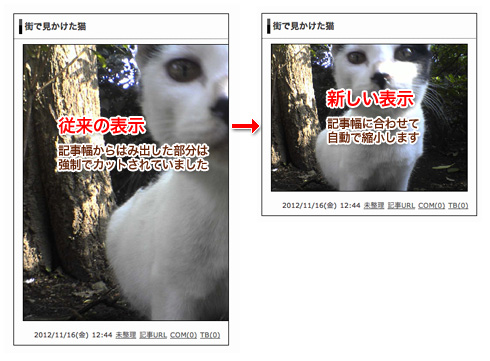
Automatic adjustment of image size
In the large image that protruded from the article width, the part protruding was forcibly cut, Today, such images are automatically reduced and displayed so that they fit within the article width.
Preview more accurately
Although a preview is displayed at the time of writing a letter in a new post, it has been improved so that it can be displayed more accurately. When "background color" of "customize> center> article style> background" is set, this background color is now applied to the preview background color.